This topic has been marked solved and closed to new posts due to inactivity. We hope you'll join the conversation by posting to an open topic or starting a new one.
- Subscribe to RSS Feed
- Mark Topic as New
- Mark Topic as Read
- Float this Topic for Current User
- Bookmark
- Subscribe
- Printer Friendly Page
-
447 Replies
-
2019-03-31 08:04 PM
-
224488 Views
-
104 Likes
-
107 In Conversation
-












- Mark as New
- Bookmark
- Subscribe
- Mute
- Subscribe to RSS Feed
- Permalink
- Report Inappropriate Content
Solved! Go to Solution.
- Related Labels:
-
Firmware Release Notes


- Mark as New
- Bookmark
- Subscribe
- Mute
- Subscribe to RSS Feed
- Permalink
- Report Inappropriate Content
@scrytch wrote:
@Expedy I’ve tried every tip or trick posted. Still no change. Glad it’s working for some but the majority no.
As it stands I’m done with Arlo and now looking to replace with another product.
The battery life was already a problem with these cameras vs Eufy (actual 365 day battery life).
Now Eufy have announced support for Homekit Secure Video I think I’ll invest in them.
That’s one I’m watching. However, I don’t like the idea of fixed batteries, both for recharging and what happens when the batteries malfunction...do I have to buy a new camera? I think functionality is still somewhat limited. Still interesting. I like Anker products.
- Mark as New
- Bookmark
- Subscribe
- Mute
- Subscribe to RSS Feed
- Permalink
- Report Inappropriate Content
@Expedy wrote:
That is certainly understandable.
Apple approved 2 Ring cameras (One wired, one battery) that have not yet been updated for HomeKit.
I really liked the Logi Circle 2 wired in HomeKit. Logi also said they will support Secure Video. Caveat; Circle 2 battery version is not HomeKit compatible.
Arlo was the first battery camera approved by Apple that has been updated for HomeKit. In that regard, there will be some glitches.
Interesting about Eufy and Secure Video. Are they battery operated or wired?
I always like to go to the support sites and communities of other brands to see what their users are saying. Here is a recent comment from a Circle user (not me). (Though I do Have two Circle cameras also)
———————
From a Circle support site:
“I’ve been dealing with this as well, since February 2019. I have 2 cameras and typically it’s only one camera that gives me issues and will never show a live stream from HomeKit, only in the LogiCircle app. Today I tried resetting both cameras and now it’s the other camera that won’t show a live stream from HomeKit and the camera that wouldn’t before, is fixed. They switched. Could this imply some sort of priority bandwidth bug? One camera has a dominant connection over the other? I’m surprised there is still no fix or acknowledgement for this issue other than generic, useless, troubleshooting tips that just assume the end user is doing something wrong. “
———————-
Sound familiar?
The grass always looks looks greener on the other side of the fence, often it sadly isn’t all that different.

- Mark as New
- Bookmark
- Subscribe
- Mute
- Subscribe to RSS Feed
- Permalink
- Report Inappropriate Content
I've had two Circle 2 wired cameras and both were viewed in HomeKit without any issues. They particularly performed well with the Homecam app on Apple TV. I hooked up one of my Apple TV's to a monitor and set Homecam to cycle thru each one and view at different live cycling speeds. Right now, I'm cycling thru all my Arlo cams live view with HomeCam.
The advantage of HomeKit, is once you swipe up from the bottom, all cams go active and give current view. In the Arlo App, you have to click on each camera.
There are advantages and disadvantages to all devices; once they're working right, it becomes personal preference.
- Mark as New
- Bookmark
- Subscribe
- Mute
- Subscribe to RSS Feed
- Permalink
- Report Inappropriate Content
I just tried to add my Circle 2 cameras to HomeKit, but it appears the codes were on the packaging which has long since been discarded. I looked at the camera, even disconnecting it from the power head, and couldn’t find anything. Perhaps it is on their support site.
(Oh, I found it on the support site...it is laser etched into the back of the Circle 2. Very difficult to see without bright light,)
Also, I’m not sure what you mean by “swipe up”. When I do that the app closes or goes to app view were I can choose or close other apps. I tried a few different gestures, but none of them turned everything to Live View. Exactly what is the gesture you are using?
- Mark as New
- Bookmark
- Subscribe
- Mute
- Subscribe to RSS Feed
- Permalink
- Report Inappropriate Content
On the Logi, the codes are inside the camera rim, very, very hard to read. I took a pic with my iPhone and zoomed in.
Re; swiping up. When your in your HomeKit app, as you know, the cameras are below your other devices (locks, lights, coffee maker, etc.), if you swipe up, your cameras become visible, you'll see on bottom right.. 1 second. 2 seconds, and so on. They recycle at 10s.
Now, I'm trying to make an NFC tag to start recording on one of the Arlo's...so far, no go...


- Mark as New
- Bookmark
- Subscribe
- Mute
- Subscribe to RSS Feed
- Permalink
- Report Inappropriate Content
They are wire free cameras but have massive batteries - 13,400 mAh. So far my camera batteries in the Eufycams I have are still over 90% charge after 2 months.
Not as feature rich as Arlo yet but rock solid in what they do provide.

- Mark as New
- Bookmark
- Subscribe
- Mute
- Subscribe to RSS Feed
- Permalink
- Report Inappropriate Content
Cool, thanks. I'll look at them when they update to HomeKit.

- Mark as New
- Bookmark
- Subscribe
- Mute
- Subscribe to RSS Feed
- Permalink
- Report Inappropriate Content
We can use Arlo camera first generation with a station Arlo pro, I wonder if it would work in HomeKit ???? is it the station itself that allows the operation in HomeKit or it is the station and the cameras that must be all version Pro .....
- Mark as New
- Bookmark
- Subscribe
- Mute
- Subscribe to RSS Feed
- Permalink
- Report Inappropriate Content
- Mark as New
- Bookmark
- Subscribe
- Mute
- Subscribe to RSS Feed
- Permalink
- Report Inappropriate Content
yes I have a base VMB4000, but the cameras are first generation originally with a station VMS3130 I would like to know if they will work in homekit
- Mark as New
- Bookmark
- Subscribe
- Mute
- Subscribe to RSS Feed
- Permalink
- Report Inappropriate Content
Can't you look it up?
- Mark as New
- Bookmark
- Subscribe
- Mute
- Subscribe to RSS Feed
- Permalink
- Report Inappropriate Content
I do not buy the station yet there is one for sale on ebay not expensive I would like to know if it works before
- Mark as New
- Bookmark
- Subscribe
- Mute
- Subscribe to RSS Feed
- Permalink
- Report Inappropriate Content
@Gerard71 wrote:
yes I have a base VMB4000, but the cameras are first generation originally with a station VMS3130 I would like to know if they will work in homekit
I have some first generation Arlo cameras attached to Pro base stations and those cameras do NOT show up in HomeKit even though Pro and Pro 2 cameras on the same base station do show up. Also I have a Pro 2 camera on a first generation base station and that does not show up either.
Als I do not see Arlo Q family cameras as eligible for HomeKit.
- Mark as New
- Bookmark
- Subscribe
- Mute
- Subscribe to RSS Feed
- Permalink
- Report Inappropriate Content
- Mark as New
- Bookmark
- Subscribe
- Mute
- Subscribe to RSS Feed
- Permalink
- Report Inappropriate Content
@bscardin wrote:
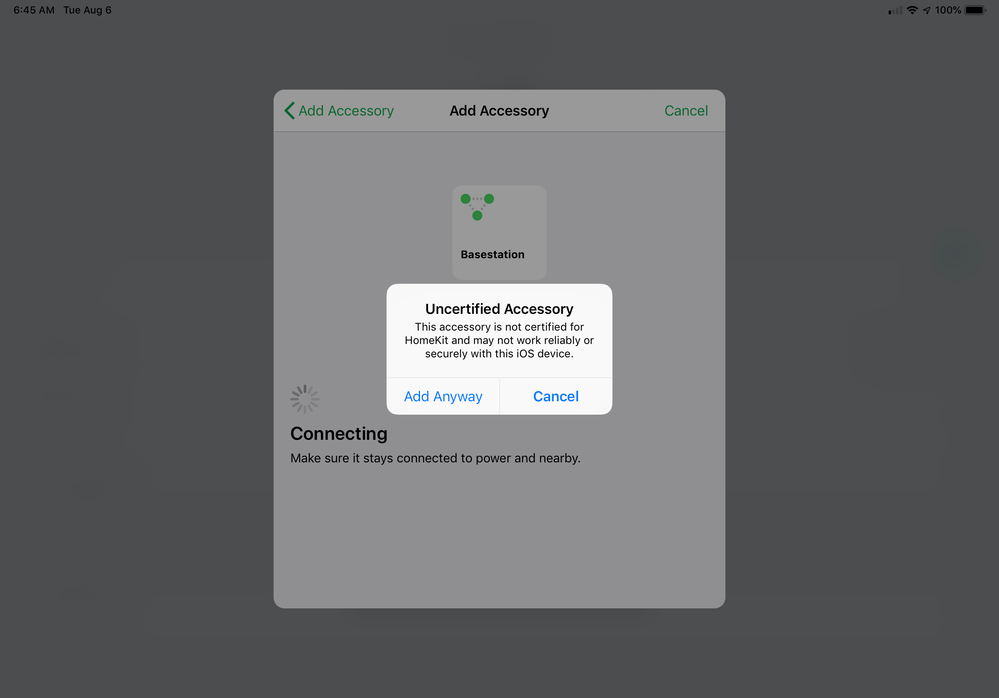
So has anyone who received the “uncertified accessory” message actually gotten it to work? There are so many different problems here it is hard to tell who fixes what. I don’t want to reset my entire smart home setup just to get the error again!
I have. The trick appeared to be to act quickly when the pop up offered the choice to “Add Anyway”.
- Mark as New
- Bookmark
- Subscribe
- Mute
- Subscribe to RSS Feed
- Permalink
- Report Inappropriate Content
Same here. I can’t get by setup. Unauthorized Device is my message.
- Mark as New
- Bookmark
- Subscribe
- Mute
- Subscribe to RSS Feed
- Permalink
- Report Inappropriate Content
- Mark as New
- Bookmark
- Subscribe
- Mute
- Subscribe to RSS Feed
- Permalink
- Report Inappropriate Content
@Mdterps wrote:
I did finally get everything to work and I no longer have any cameras with the uncertified error message. I have two base stations and originally set them both up with HomeKit when it was released. I did have the uncertified error for all my devices. Basically, I had to remove both my arlo hubs from from HomeKit, then I actually had to use the “reset HomeKit” option. For those of you with other HomeKit devices this is probably not a great option because I think it wipes everything in HomeKit but these were my only devices so it wasn’t too bad for me. Once my HomeKit was cleared out, I rebooted my base stations, rebooted my iPad and iPhone and then started over. One of my base stations added right away and did not have the uncertified error. My second base station after many tries finally found the base station, but gave me an error that it was already added to HomeKit and I would need to reset it (or something along those lines). So for this base station I had to remove all cameras, remove the base from my arlo account, reset the base by holding the reset button for 10 seconds and then add everything back again. Once I did that, my base was found right away and all my cameras added with no more uncertified messages.
Wow. What an incredible PITA. And that’s assuming one has no significant current HomeKit environment.
- Mark as New
- Bookmark
- Subscribe
- Mute
- Subscribe to RSS Feed
- Permalink
- Report Inappropriate Content
I had much difficulty in setting up Homekit with no Homekit ID, etc... The online instructions didn't seem to work until I stumbled on one CRITICAL item. In IOS Setting>Privacy>HomeKit, make sure the toggle to allow ARLO access to HomeKit is enabled. After this step, everything worked just fine.
- Mark as New
- Bookmark
- Subscribe
- Mute
- Subscribe to RSS Feed
- Permalink
- Report Inappropriate Content
Well I'm pretty much giving up. I've almost had it with Arlo in general since it has been nothing but frustrations lately. Here is what I tried to get around the "Uncertified Accessory" error:
- Reset HomeKit
- Removed Hub
- Removed Arlo Q
- Reset base station
- Logged out of Arlo App
- Deleted Arlo app from phone
- Turned off all iDevices: 2 Apple TVs, 2 iMacs, iPhone X, iPad
- Powered off network rack (all switches, routers, hubs, smart things, wifi)
- Powered up the network rack
- Powered on just the iPhone X
- Installed the Arlo app
- Added the base station
- Added a single Arlo Pro camera
- Followed the homekit setup via the Arlo app - added a new home to homekit from within the arlo app (I've tried this both ways)
- Got the Uncertified Accessory error
- Cursed. A lot.
- Started the long process of adding everthing back to the way it was.
Side note - I Have a Lutron Caseta system and throughout this process I've had to re-add it to HomeKit several times. It has worked flawlessly each time. Just sayin'
The only reason I'm not hauling the whole Arlo system to the trash is because I've spent so much damn money and don't want to buy a bunch of other stuff right now. Over time I guess I'll plan to phase out this soul suckingly terribly system. Seriously Arlo, start paying more for software development! First the Doorbell disaster (don't get me started) and now this. I used to recommend this system but not anymore!
- Mark as New
- Bookmark
- Subscribe
- Mute
- Subscribe to RSS Feed
- Permalink
- Report Inappropriate Content
The doorbell was terrible. I ended up using it as a motion trigger/camera other than the front door.
Arlo Q? On Arlo's Twitter page; "Apple HomeKit now works with #Arlo Pro 2 and Arlo Pro cameras."
- Mark as New
- Bookmark
- Subscribe
- Mute
- Subscribe to RSS Feed
- Permalink
- Report Inappropriate Content
- Mark as New
- Bookmark
- Subscribe
- Mute
- Subscribe to RSS Feed
- Permalink
- Report Inappropriate Content
To say this had been the single most frustrating customer experience of my life is no u understatement.
I did your run though and got everything set up great first go, but didn’t name my cameras at the time of set up. I couldn’t find how to rename them so I deleted my set up and started again, on to be stuck on the “Uncertified accessory” loop now.
How could it work perfectly once and now fail every time now?!?
I even Removed my vase station and setup everything again, however now I have lost my Arlo Smart subscription connection on the cameras that were subscribed and there’s no way to easily readd them in the app or online!
I’m not really sure what to do now?
I’m ready to through the whole system in the bin and get something else!

- Mark as New
- Bookmark
- Subscribe
- Mute
- Subscribe to RSS Feed
- Permalink
- Report Inappropriate Content
@rwarren1 ha escrito:
I was finally able to add my VMB4000r3 base station to my eero network. I have a xfinity cable modem with the wifi turned off. My eero base station plugs into one of the 4 ethernet ports on the cable modem. My VMB4000r3 was originally plugged into one of the other ethernet ports. Homekit did not find the base station until I connected the base station ethernet directly to the eero base station. Odd because the Arlo app has always worked perfectly.
I am left with 2 problems that I cannot resolve.
1. The Arlo cameras only show up in the Home app on my iPhone. I do not see them on my iPad, Macbook Pro or Mac Pro.
2. When I try to view a camera remotely with the Home app, it says "The camera is not responding". I can remotely view the cameras with the Arlo app but not the Home app.
Yes, I have the same issue with the ipad. It works with my iphone, but I can’t set up the home app on the ipad.
- Mark as New
- Bookmark
- Subscribe
- Mute
- Subscribe to RSS Feed
- Permalink
- Report Inappropriate Content
ok thank you for your reply
-
Amazon Alexa
117 -
Apple HomeKit
774 -
Apple TV App
7 -
AppleTV
33 -
Arlo Mobile App
62 -
Arlo Pro
2 -
Arlo Pro 2
1 -
Arlo Q (Plus)
1 -
Arlo Secure
10 -
Arlo Smart
39 -
Arlo Wire-Free
1 -
Before You Buy
30 -
Features
88 -
Firmware Release Notes
8 -
Google Assistant
103 -
IFTTT
100 -
IFTTT (If This Then That)
117 -
Installation
91 -
Modes and Rules
13 -
Motion Detection
1 -
Online and Mobile Apps
70 -
Samsung SmartThings
89 -
Security System
1 -
Service and Storage
5 -
SmartThings
73 -
Troubleshooting
400 -
Videos
1
- « Previous
- Next »
-
447 Replies
-
2019-03-31 08:04 PM
-
224489 Views
-
104 Likes
-
107 In Conversation
-