This topic has been closed to new posts due to inactivity. We hope you'll join the conversation by posting to an open topic or starting a new one.
- English
- /
- Arlo Forum Discussions
- /
- Partner Integrations
- /
- Re: Apple HomeKit stuck at "Discovering your devic...
- Subscribe to RSS Feed
- Mark Topic as New
- Mark Topic as Read
- Float this Topic for Current User
- Bookmark
- Subscribe
- Printer Friendly Page
-
613 Replies
-
2020-09-25 09:48 AM
-
205901 Views
-
40 Likes
-
292 In Conversation
-















- Mark as New
- Bookmark
- Subscribe
- Mute
- Subscribe to RSS Feed
- Permalink
- Report Inappropriate Content
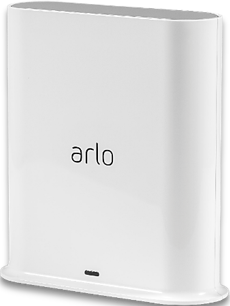
I had HomeKit set up but then removed it because I was reorganizing things. Now when I try to add my base station again the app just gets stuck on "Discovering your device. Please wait." I saw this posted elsewhere for a different hub and support sent a token reset request which seemed to resolve the issue for others. Is that what I need here?
- Related Labels:
-
Apple HomeKit

- Mark as New
- Bookmark
- Subscribe
- Mute
- Subscribe to RSS Feed
- Permalink
- Report Inappropriate Content
Hi corykrug,
I've sent a token request to your Base Station again. Please make sure to reboot your Base Station (remove and reapply power), allow it to come back online and try setting up HomeKit again using these instructions: How do I connect my Arlo camera to Apple HomeKit?
If you're still having issues, contact the Support Team to further investigate this issue. You will find several options for contacting support in the provided link.

- Mark as New
- Bookmark
- Subscribe
- Mute
- Subscribe to RSS Feed
- Permalink
- Report Inappropriate Content
Hi
I'm having the same issue. Could you please issue a reset token for me.
Regards
- Mark as New
- Bookmark
- Subscribe
- Mute
- Subscribe to RSS Feed
- Permalink
- Report Inappropriate Content
Hi oxFreedom,
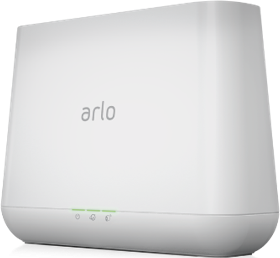
I've sent a token reset request to your Base Station/SmartHub that should resolve the issue. Please reboot your Base Station/SmartHub (remove and reapply power), allow the Base Station/SmartHub to come back online and try setting up HomeKit again using these instructions: How do I connect my Arlo camera to Apple HomeKit?
- Mark as New
- Bookmark
- Subscribe
- Mute
- Subscribe to RSS Feed
- Permalink
- Report Inappropriate Content
- Mark as New
- Bookmark
- Subscribe
- Mute
- Subscribe to RSS Feed
- Permalink
- Report Inappropriate Content
Please also send reset token request to my base station. Still having this problem and I tried everything except for the reset token. Thank you!
- Mark as New
- Bookmark
- Subscribe
- Mute
- Subscribe to RSS Feed
- Permalink
- Report Inappropriate Content
- Mark as New
- Bookmark
- Subscribe
- Mute
- Subscribe to RSS Feed
- Permalink
- Report Inappropriate Content
Hi SwissMaster, AnimaliA, Kingsvillains,
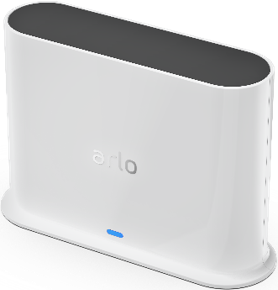
I've sent a token reset request to your Base Station/SmartHub that should resolve the issue. Please reboot your Base Station/SmartHub (remove and reapply power), allow the Base Station/SmartHub to come back online and try setting up HomeKit again using these instructions: How do I connect my Arlo camera to Apple HomeKit?
- Mark as New
- Bookmark
- Subscribe
- Mute
- Subscribe to RSS Feed
- Permalink
- Report Inappropriate Content
https://community.arlo.com/t5/Partner-Integrations/Arlo-Pro-2-HomeKit-setup-issues/m-p/1751085
Unable to setup HomeKit which worked before and seemed to be resolved by a token reset. Can I have the token reset please?
- Mark as New
- Bookmark
- Subscribe
- Mute
- Subscribe to RSS Feed
- Permalink
- Report Inappropriate Content
Hi Apburke15,
I've sent a token reset request to your Base Station/SmartHub that should resolve the issue. Please reboot your Base Station/SmartHub (remove and reapply power), allow the Base Station/SmartHub to come back online and try setting up HomeKit again using these instructions: How do I connect my Arlo camera to Apple HomeKit?
- Mark as New
- Bookmark
- Subscribe
- Mute
- Subscribe to RSS Feed
- Permalink
- Report Inappropriate Content
Thanks Jessica. I have tried to reset HomeKit but I can’t remove the basestation as it says it is unresponsive although it is working and linked to a camera. I think there may be an issue with the basestation. Amy ideas?
- Mark as New
- Bookmark
- Subscribe
- Mute
- Subscribe to RSS Feed
- Permalink
- Report Inappropriate Content
When you remove the Base Station, make sure you're "unplugging and re-plugging the power" on your Base Station/SmartHub: To power cycle your base station, unplug the power adapter from the outlet, wait two minutes, and reconnect the power adapter to the outlet. The base station takes one to two minutes to start.
- Mark as New
- Bookmark
- Subscribe
- Mute
- Subscribe to RSS Feed
- Permalink
- Report Inappropriate Content
Thanks,
Yens
- Mark as New
- Bookmark
- Subscribe
- Mute
- Subscribe to RSS Feed
- Permalink
- Report Inappropriate Content
My Arlo is stuck at connecting the bridge. One hour waiting and don’t connect. Already reseted the base station. Turned off. No luck. Considering returning them. The only reason to bought the system was homekit integration.

- Mark as New
- Bookmark
- Subscribe
- Mute
- Subscribe to RSS Feed
- Permalink
- Report Inappropriate Content
I am the same issue: Stuck on Discovering your device. Please wait.
I understand you need to reset an authentication token, how does that work / how do I request it?
Thanks
- Mark as New
- Bookmark
- Subscribe
- Mute
- Subscribe to RSS Feed
- Permalink
- Report Inappropriate Content
- Mark as New
- Bookmark
- Subscribe
- Mute
- Subscribe to RSS Feed
- Permalink
- Report Inappropriate Content
I am convinced that Arlo & HomeKit are not very compatible. 😞
- Mark as New
- Bookmark
- Subscribe
- Mute
- Subscribe to RSS Feed
- Permalink
- Report Inappropriate Content
Hi Yens, Berny710, Gimrigz, Kfortune117, RockyB_vl,
I've sent a token reset request to your Base Station/SmartHub that should resolve the issue. Please reboot your Base Station/SmartHub (remove and reapply power), allow the Base Station/SmartHub to come back online and try setting up HomeKit again using these instructions: How do I connect my Arlo camera to Apple HomeKit?
- Mark as New
- Bookmark
- Subscribe
- Mute
- Subscribe to RSS Feed
- Permalink
- Report Inappropriate Content
Hi!
I've removed my Arlo Pro 2 kit from one Homekit account and I want to add it to another. It hangs on the "Discovering your device. Please wait". Can you send the token/auth reset please?
Thanks!
- Mark as New
- Bookmark
- Subscribe
- Mute
- Subscribe to RSS Feed
- Permalink
- Report Inappropriate Content
Need a token reset too. Stuck in discovering your device screen.
trying to connect to HomeKit. I was once connected but after some issues I tried to reconnect and cannot. I’ve read others having this same issue and you would send them a token reset to the base and it would solve the issue.
- Mark as New
- Bookmark
- Subscribe
- Mute
- Subscribe to RSS Feed
- Permalink
- Report Inappropriate Content
Hi zoomies, Formguys2,
I've sent a token reset request to your Base Station/SmartHub that should resolve the issue. Please reboot your Base Station/SmartHub (remove and reapply power), allow the Base Station/SmartHub to come back online and try setting up HomeKit again using these instructions: How do I connect my Arlo camera to Apple HomeKit?
- Mark as New
- Bookmark
- Subscribe
- Mute
- Subscribe to RSS Feed
- Permalink
- Report Inappropriate Content
- Mark as New
- Bookmark
- Subscribe
- Mute
- Subscribe to RSS Feed
- Permalink
- Report Inappropriate Content
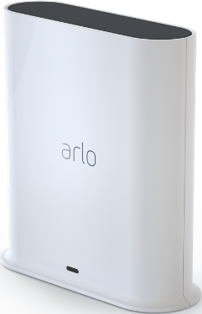
I am unable to get my arlo pro 2 base station to connect to Homekit and I've seen that's a recurring issue and is essentially always solved by customer service sending a token reset. How can I get one?
- Mark as New
- Bookmark
- Subscribe
- Mute
- Subscribe to RSS Feed
- Permalink
- Report Inappropriate Content
Hi CabelloA, Mistydwn,
I've sent a token reset request to your Base Station/SmartHub that should resolve the issue. Please reboot your Base Station/SmartHub (remove and reapply power), allow the Base Station/SmartHub to come back online and try setting up HomeKit again using these instructions: How do I connect my Arlo camera to Apple HomeKit?
- Mark as New
- Bookmark
- Subscribe
- Mute
- Subscribe to RSS Feed
- Permalink
- Report Inappropriate Content
Worked like a charm! Connected with no issue at all after restarting with the token. Thank you so much!
- Mark as New
- Bookmark
- Subscribe
- Mute
- Subscribe to RSS Feed
- Permalink
- Report Inappropriate Content
Can you help send a token reset so I can add it to my Apple Homekit?
-
Amazon Alexa
115 -
Apple HomeKit
740 -
Apple TV App
7 -
AppleTV
33 -
Arlo Mobile App
61 -
Arlo Pro
2 -
Arlo Pro 2
1 -
Arlo Q (Plus)
1 -
Arlo Secure
10 -
Arlo Smart
39 -
Arlo Wire-Free
1 -
Before You Buy
30 -
Features
88 -
Firmware Release Notes
8 -
Google Assistant
99 -
IFTTT
95 -
IFTTT (If This Then That)
117 -
Installation
90 -
Modes and Rules
13 -
Motion Detection
1 -
Online and Mobile Apps
70 -
Samsung SmartThings
86 -
Security System
1 -
Service and Storage
5 -
SmartThings
73 -
Troubleshooting
397 -
Videos
1
- « Previous
- Next »
-
613 Replies
-
2020-09-25 09:48 AM
-
205902 Views
-
40 Likes
-
292 In Conversation
-