- Subscribe to RSS Feed
- Mark Topic as New
- Mark Topic as Read
- Float this Topic for Current User
- Bookmark
- Subscribe
- Printer Friendly Page
-
53 Replies
-
2018-09-20 11:57 AM
-
27585 Views
-
29 Likes
-
31 In Conversation
-


- Mark as New
- Bookmark
- Subscribe
- Mute
- Subscribe to RSS Feed
- Permalink
- Report Inappropriate Content
arlo is playing notification cannot be cleared. Android 9 on Pixel 2.
Also neither geofencing for scheduled arming work. I have to do it manually. This has been broken for a very long time. Is this ever going to get fixed?

NV+ 4410

- Related Labels:
-
Online and Mobile Apps
-
Troubleshooting

- Mark as New
- Bookmark
- Subscribe
- Mute
- Subscribe to RSS Feed
- Permalink
- Report Inappropriate Content
Hey @bhaverkamp,
Could you clarify which notification cannot be cleared? Are you saying you cannot close the notification on your phone that is coming from the Arlo app?
And for geofencing, try to change your radius if it is not detecting anything for scheduled arming.
- Mark as New
- Bookmark
- Subscribe
- Mute
- Subscribe to RSS Feed
- Permalink
- Report Inappropriate Content
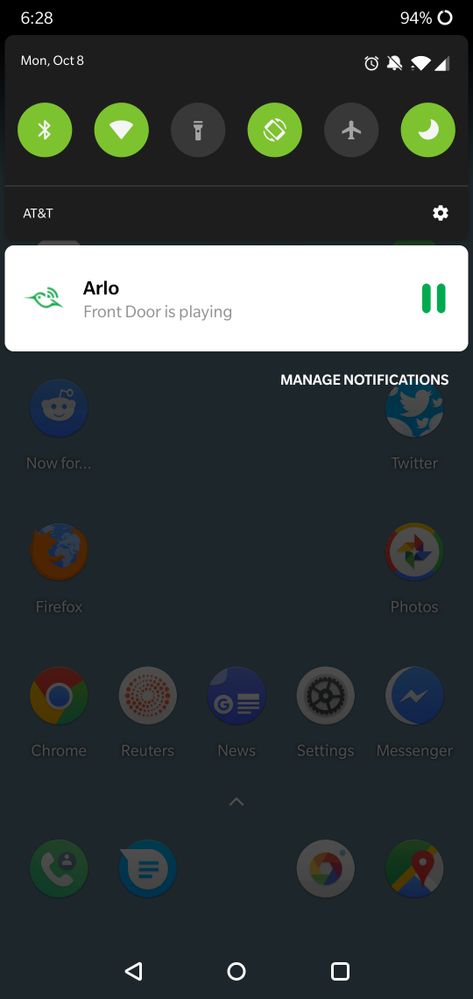
The notification says "Front Door is playing" with a paused indicator. It cannot be wiped away. If I swipe right and hold a setting "gear" indicator is shown. Selecting that clears the notification without showing any settings. Anything else and it stays in place. The pause button seems non-functional. Also this seems to happen randomly even when there have been no camera events.
WTR to the geofencing the radius really seems to have no effect. Usually, if I open the app and then use google maps to show my location I can get the geofencing to react but that is even more inconvenient than manually turning it on/off. Same is true for scheduled arming; opening the app will sometimes cause it to arm/disarm but it never does so on it's own. This used to work reasonably well. It's completely broken now.
NV+ 4410
- Mark as New
- Bookmark
- Subscribe
- Mute
- Subscribe to RSS Feed
- Permalink
- Report Inappropriate Content
For the notification, could you share a screenshot so I can see the issue you're experiencing?
For geofencing, do you have power saving settings enabled on your Android? Make sure that you don't force close the app and have it running in the background to ensure the location is working properly.


- Mark as New
- Bookmark
- Subscribe
- Mute
- Subscribe to RSS Feed
- Permalink
- Report Inappropriate Content
I am having the exact same problem for the past few days. Same notification, same symptoms. Also same phone and operating system - Android Pie and Pixel 2.
- Mark as New
- Bookmark
- Subscribe
- Mute
- Subscribe to RSS Feed
- Permalink
- Report Inappropriate Content
Hey @SierraMike77,
Have you tried the troubleshooting steps that was given above? And could you also provide a screenshot so I can take a closer look?
- Mark as New
- Bookmark
- Subscribe
- Mute
- Subscribe to RSS Feed
- Permalink
- Report Inappropriate Content
I'm not sure what trouble shooting steps you're referring to, as I didn't see any in the thread. I've attached the screen shot of the notification that cannot be swiped away, and tapping on the notification does nothing. (It doesn't open the app, it doesn't pause anything. It just stays there until the phone is reset. Forcing the Arlo app to quit does not remove the notification.)

- Mark as New
- Bookmark
- Subscribe
- Mute
- Subscribe to RSS Feed
- Permalink
- Report Inappropriate Content
If you're referring to the steps you referenced regarding geofencing, that is inapplicable. I have never used any of the geofencing capability of the system.
- Mark as New
- Bookmark
- Subscribe
- Mute
- Subscribe to RSS Feed
- Permalink
- Report Inappropriate Content
Could you let me know how you were able to reproduce this issue where the notification cannot be swiped away so I can try looking into this?
- Mark as New
- Bookmark
- Subscribe
- Mute
- Subscribe to RSS Feed
- Permalink
- Report Inappropriate Content
I have two cameras, "front" and "back." They appear in my arlo app in that order. If I play the live view of the "back" camera, and press the "home" button my phone without first pausing the camera, I get the notification.
- Mark as New
- Bookmark
- Subscribe
- Mute
- Subscribe to RSS Feed
- Permalink
- Report Inappropriate Content
I would suggest you contacting our Arlo Support Team so they can further assist you with your notifications not clearing out on your Android phone.
- Mark as New
- Bookmark
- Subscribe
- Mute
- Subscribe to RSS Feed
- Permalink
- Report Inappropriate Content
I have the following
Arlo Pro 2
Oneplus6
Android PIe
After the Android Pie update I get the same issue and it is reproduceable everytime. This is what happens
you are viewing your cameras live, if you do anything other than click "pause" (for example press the home or back button) you will get a notification that says "xxxx camera is playing"
there is a pause button next to it
The pause does nothing
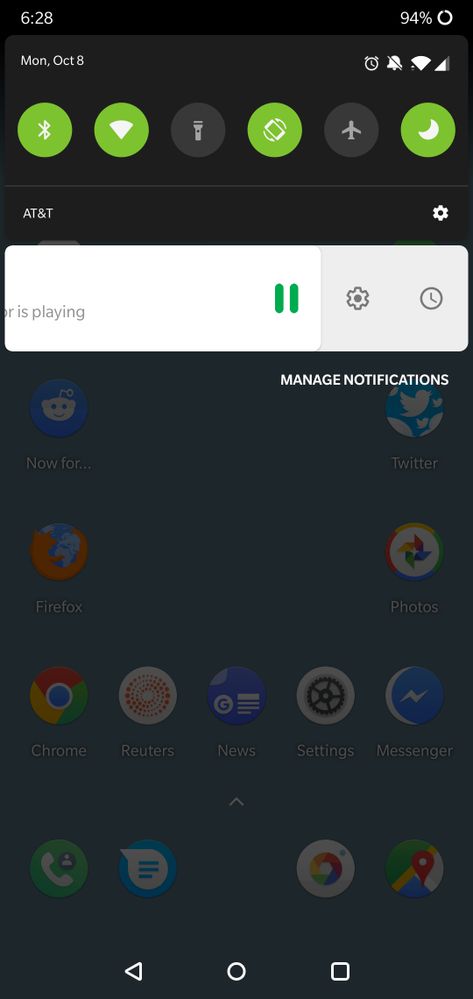
if i try to dismiss the app it wont, but it slides to the left slightly revealing more options
a gear (for i assume settings)
and a clock (for delaying notifications)
if i click the gear the homescreen/launcher crashes (the background goes black) then the phone locks itself as if it has gone to sleep
the notification is cleared after this however
there seem to be no way to stop this particular notification as Arlo seems to only have the ability to turn on all or none notifications
I have provided screen shots

- Mark as New
- Bookmark
- Subscribe
- Mute
- Subscribe to RSS Feed
- Permalink
- Report Inappropriate Content
Giving the heads up that our team is looking into this issue. We will provide an update if we have any information to share regarding this.


- Mark as New
- Bookmark
- Subscribe
- Mute
- Subscribe to RSS Feed
- Permalink
- Report Inappropriate Content
For those experiencing this issue, could you provide the following information about your Android device:
Android version
Kernel version
Build version
This can be found under Settings > System > About Phone > Tap Android Version
JamesC

- Mark as New
- Bookmark
- Subscribe
- Mute
- Subscribe to RSS Feed
- Permalink
- Report Inappropriate Content
I'm experiencing the same issue where I cannot clear the "<camera> is playing" notification.
Android version: 9
Kernal Version:4.9.96
Build Number: PD1A.180720.031
- Mark as New
- Bookmark
- Subscribe
- Mute
- Subscribe to RSS Feed
- Permalink
- Report Inappropriate Content

- Mark as New
- Bookmark
- Subscribe
- Mute
- Subscribe to RSS Feed
- Permalink
- Report Inappropriate Content
Android 9 with October update
Build PPR2.181005.003
- Mark as New
- Bookmark
- Subscribe
- Mute
- Subscribe to RSS Feed
- Permalink
- Report Inappropriate Content

- Mark as New
- Bookmark
- Subscribe
- Mute
- Subscribe to RSS Feed
- Permalink
- Report Inappropriate Content
Kernal version 4.9.106-perf+
Build number oneplusa6003_22_180915
- Mark as New
- Bookmark
- Subscribe
- Mute
- Subscribe to RSS Feed
- Permalink
- Report Inappropriate Content
If you press and hold the pause button on the notification it causes a crash of some sort which clears the notification and brings you to your lock screen. Not a fix, but a workaround to remove the notification until it's fixed on Pie.
My phone info:
Pixel 3 XL
Android version
9
Android security patch level
September 5, 2018
Baseband version
g845-00023-180815-B-4956438
Kernel version
4.9.96-g340a9aaf92bc-ab4959234
#0 Thu Aug 16 23:24:20 UTC 2018
Build number
PD1A.180720.030
- Mark as New
- Bookmark
- Subscribe
- Mute
- Subscribe to RSS Feed
- Permalink
- Report Inappropriate Content
Question, does turning off the notification only turn off that particular notification or all notifications?
also i neglected to provide the requested information
Android Version 9
Kernel Version 4.9.106-perf+
#1 Sat Sep 15 01:11:54 CST 2018
Build Number ONEPLUS A6003_22_180915
- Mark as New
- Bookmark
- Subscribe
- Mute
- Subscribe to RSS Feed
- Permalink
- Report Inappropriate Content
Recieved a new app update today at 1:55PM from the play store, v 2.6.1_22700. It appears this update still has not fixed the ongoing issue with the notification getting stuck on the screen and having to hold the notification the lock the screen and clear it.
Can we please get an update on to when this issue will be fixed and how has it been missed for 3 months?
- Mark as New
- Bookmark
- Subscribe
- Mute
- Subscribe to RSS Feed
- Permalink
- Report Inappropriate Content


- Mark as New
- Bookmark
- Subscribe
- Mute
- Subscribe to RSS Feed
- Permalink
- Report Inappropriate Content
I have a Pixel 2 Xl and can not delete the push notification "back porch is playing."
I can not wipe to the right and delete like other notifications. The only way to delete it is to restart my phone.
Any suggestions.
I have version 2.6.1_22700 which was released on 10/23/18
I just installed the system yesterday.
Thanks for any assistance. It is annoying to see the notification.


- Mark as New
- Bookmark
- Subscribe
- Mute
- Subscribe to RSS Feed
- Permalink
- Report Inappropriate Content
Can you swipe right, use the gear icon and mute?
-
Accessories
4 -
Activity Zones
1 -
Amazon Alexa
1 -
Apple HomeKit
2 -
Apple TV App
9 -
Applications mobile et en ligne
1 -
Apps
4 -
Arlo Go
3 -
Arlo Mobile App
823 -
Arlo Pro
36 -
Arlo Pro 2
1 -
Arlo Q (Plus)
3 -
Arlo Smart
222 -
Arlo Web and Mobile Apps
18 -
Arlo Wire-Free
30 -
base station
1 -
Batteries
529 -
Before You Buy
961 -
Can't view cameras live at all
1 -
Dépannage
1 -
Détection de mouvements
1 -
Features
1,126 -
Fehlerbehebung
1 -
Firmware Release Notes
93 -
Google Assistant
1 -
Hardware
1 -
home security
1 -
IFTTT (If This Then That)
105 -
Installation
2,063 -
Iphone 14 pro
1 -
Live view
1 -
Modes and Rules
1 -
Motion Detection
2 -
Object Recognition
3 -
Online and Mobile Apps
983 -
Online und mobile Apps
1 -
Order Not Going Through... help please!
1 -
Other Discussions
1 -
Partner Integrations
4 -
Security
1 -
Service and Storage
14 -
Smart Subscription
3 -
SmartThings
71 -
Troubleshooting
9,237 -
Videos
233 -
Vidéo
2 -
Warranty & Contracts
2
- « Previous
- Next »
-
53 Replies
-
2018-09-20 11:57 AM
-
27586 Views
-
29 Likes
-
31 In Conversation
-