- Subscribe to RSS Feed
- Mark Topic as New
- Mark Topic as Read
- Float this Topic for Current User
- Bookmark
- Subscribe
- Printer Friendly Page
-
66 Replies
-
2018-03-22 05:08 AM
-
63126 Views
-
26 Likes
-
32 In Conversation
-


- Mark as New
- Bookmark
- Subscribe
- Mute
- Subscribe to RSS Feed
- Permalink
- Report Inappropriate Content
All of a sudden, after working 9 months perfectly, Geofencing on my Arlo Pro system has stopped working. When I go into the settings the phones are reporting the wrong status, and i have to toggle them on/off to get it to start working. I have two iphones setup for geofencing. Any ideas of what I can do to get this working to how it was in the past?

- Related Labels:
-
Online and Mobile Apps
-
Troubleshooting


- Mark as New
- Bookmark
- Subscribe
- Mute
- Subscribe to RSS Feed
- Permalink
- Report Inappropriate Content
Thank you, many users are really waiting with bated breath for the iPhone app geofencing fix. In the meantime, please suggest to the engineering team that they withdraw 2.4.7 from the Apple app store and replace it with 2.4.6. This will allow us all to breathe a sigh of relief, and take the pressure off the iOS team so they can concentrate on a well-designed fix for 2.4.7.
- Mark as New
- Bookmark
- Subscribe
- Mute
- Subscribe to RSS Feed
- Permalink
- Report Inappropriate Content

- Mark as New
- Bookmark
- Subscribe
- Mute
- Subscribe to RSS Feed
- Permalink
- Report Inappropriate Content
Yes, the 2.4.8 update fixes geofencing for me. This should have never happened in the first place, it took a long time to fix but finally the breakdown in the their software development lifecyce is resolved.

- Mark as New
- Bookmark
- Subscribe
- Mute
- Subscribe to RSS Feed
- Permalink
- Report Inappropriate Content


- Mark as New
- Bookmark
- Subscribe
- Mute
- Subscribe to RSS Feed
- Permalink
- Report Inappropriate Content
Sorry, but it still doesnt work for me. Also updated to 2.4.8. today.
Both iPhones leaved Homezone and were shown as "outside" but Cameras still didnt activated.
All ideas appreciated...
@DanO16wrote:
Yay, 2.4.8 for iOS was just released, and geofencing is working again!
- Mark as New
- Bookmark
- Subscribe
- Mute
- Subscribe to RSS Feed
- Permalink
- Report Inappropriate Content
- Mark as New
- Bookmark
- Subscribe
- Mute
- Subscribe to RSS Feed
- Permalink
- Report Inappropriate Content
Would love to point out that the Android Arlo app version 2.4.10-20077 remains unupdated as at 3rd April and Geofencing is STILL an issue. I have NOT recieved any updates from Netgear about this issue and what is being done about it. Would love to hear more for the Netgear team, or are they relying on the community sorting out their engineering problems for them?
- Mark as New
- Bookmark
- Subscribe
- Mute
- Subscribe to RSS Feed
- Permalink
- Report Inappropriate Content
My geofencing seems to be working after I wiped my Samsung S8 and reinstalled everything, however - everynight now at midnight the app is changing mode from 'geofencing' to 'armed' and then never changes back to geofencing or even schedule unless I manually change it back in the app. If this is not related - I can start a new discussion.
Thanks.
- Mark as New
- Bookmark
- Subscribe
- Mute
- Subscribe to RSS Feed
- Permalink
- Report Inappropriate Content
I can report that there was an update to the Arlo app (Android). It's now on v 2.4.11_20331. However, the app STILL crashes and as a result geofencing doesn't update until you physically reopen the app on your phone. Maybe this is what's happening to you?
Certainly not a solution and I've been told by Netgear (again) that it's a "known issue". Okay, I get that. But seeing how long it's taking to fix, I'm guessing they "don't know the solution". I've recommended people choose other options out there.
As soon as I decide on which alternative security system I want to go with, I'm going to exercise my consumer rights under the Australian Consumer Law and get a full refund on this system. Not sure if others have similar rights in other countries. I would probably go with either the logicircle 2 (no alarm however, and wired mostly), wait for the Eufy/Anker EverCam to be released (looks like a Arlo killer, which I really don't mind) or go with the Ring cameras. Last two options are probably great replacements for Arlo. BTW, I've owned several Netgear pieces of... Can't say here. I bought them on good faith and because of the seeminly "well known brand with reputation." All of the Netgear things I've bought have been disappointments and I vowed never to buy a Netgear product again. Arlo came out and the press was all over it. I thought, pretty cool, maybe they've impoved. I should have stuck to my NO NETGEAR rule...
- Mark as New
- Bookmark
- Subscribe
- Mute
- Subscribe to RSS Feed
- Permalink
- Report Inappropriate Content
Geofencing was working intermittently but now does not even work at all. I can not see location on arlo app.
Tried chat but of no help.. Did reset reboot etc etc everything
- Mark as New
- Bookmark
- Subscribe
- Mute
- Subscribe to RSS Feed
- Permalink
- Report Inappropriate Content
Unfortunately, my experience with Netgear "support" was terrible. They've promised to "call me" 3 times now. Never got a call. They said sorry and they'll try again today. Today is ending soon. So chalk up 4 times. I'm probably going to jump ship away from Arlo and maybe go with Ring Cams.
- Mark as New
- Bookmark
- Subscribe
- Mute
- Subscribe to RSS Feed
- Permalink
- Report Inappropriate Content
Geofencing is not switching modes.
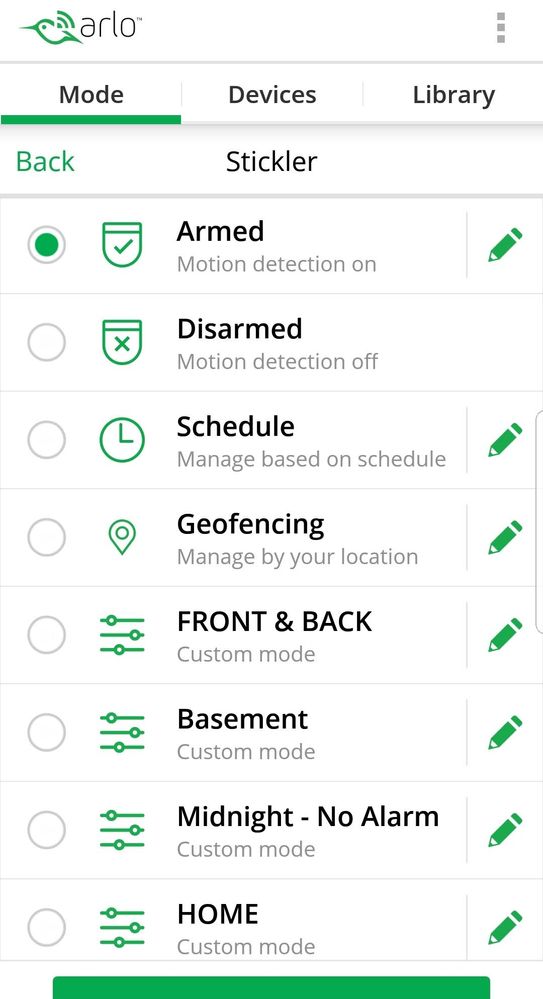
Geofencing set to Away-ARMED / Home-Schedule
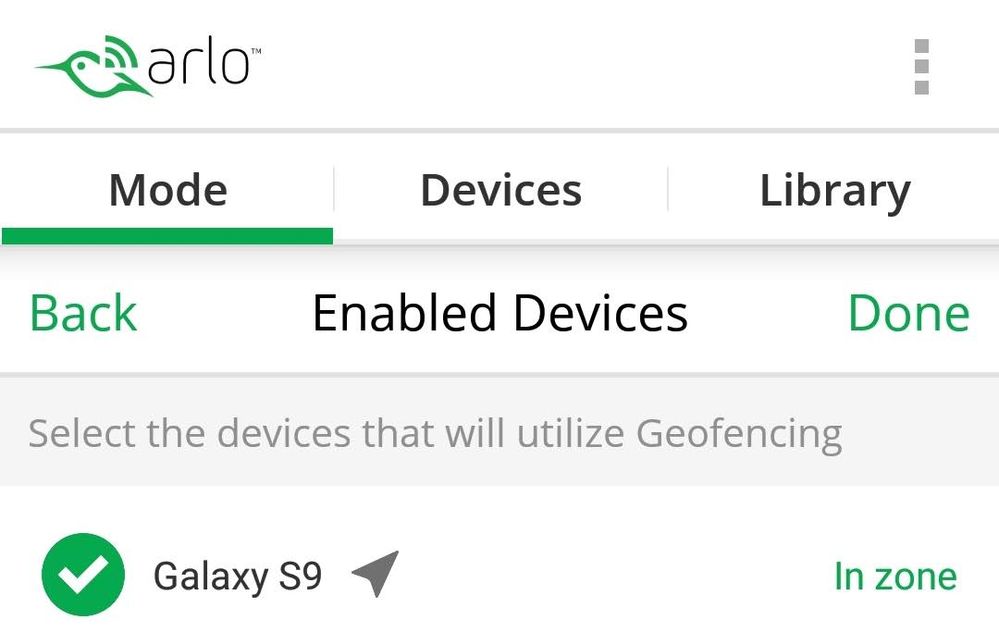
Enabled Devices - Phone is "In Zone"
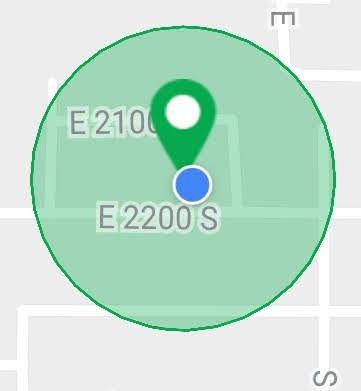
App Map shows within Zone
So the app is correctly showing that my phones are within the HOME ZONE. Yet the Geofencing MODE never switches to HOME and stays in AWAY.
not



- Mark as New
- Bookmark
- Subscribe
- Mute
- Subscribe to RSS Feed
- Permalink
- Report Inappropriate Content
The engineering team is currently investigating issues reported by users that Geofencing is not changing modes as it should. I will provide an update as soon as I have more information.
JamesC
- Mark as New
- Bookmark
- Subscribe
- Mute
- Subscribe to RSS Feed
- Permalink
- Report Inappropriate Content

- Mark as New
- Bookmark
- Subscribe
- Mute
- Subscribe to RSS Feed
- Permalink
- Report Inappropriate Content
Hey @Bostro,
Our team is still looking into the issue where Geofencing is not changing modes when it should be.
For your Arlo Audio Doorbell having battery life problems, make sure that you are using brand new batteries. And for the Doorbell not sync properly, try to make sure that your Base Station has no internet connection problems.
- Mark as New
- Bookmark
- Subscribe
- Mute
- Subscribe to RSS Feed
- Permalink
- Report Inappropriate Content
When it comes to doorbel I replaced batteries and moved arlo base to other room and hard-wired to ethernet port in the wall. In this case ots also far from the Wifi router. Its 3rd day and so far so good. No issues and batery level is 98%.
- Mark as New
- Bookmark
- Subscribe
- Mute
- Subscribe to RSS Feed
- Permalink
- Report Inappropriate Content
I too can confirm that my system was not working correctly. Main account phone would perform as directed, but second phone would not, although it did show within the geofence. I did a hard reset on both phones, and all appears to be working correctly, for now...
- Mark as New
- Bookmark
- Subscribe
- Mute
- Subscribe to RSS Feed
- Permalink
- Report Inappropriate Content
No comments of this is luck or something.
- Mark as New
- Bookmark
- Subscribe
- Mute
- Subscribe to RSS Feed
- Permalink
- Report Inappropriate Content
Forgotten to annouce, the switching after few days is not working any more effectivly.
- Mark as New
- Bookmark
- Subscribe
- Mute
- Subscribe to RSS Feed
- Permalink
- Report Inappropriate Content
Geofencing hasn't worked in the last couple of weeks. My phone shows unavailable in app. I've tried taking it off the app, logging out of app then logging back in but it still shows unavailable. I noticed the app updated in the beginning of April. Not sure if that caused the problem. I've been using geofencing successfully for over a year. Anyone have any suggestions.
- Mark as New
- Bookmark
- Subscribe
- Mute
- Subscribe to RSS Feed
- Permalink
- Report Inappropriate Content
Hi @theboot1 ,
Can you share if this is on iOS or Android?
- If on iOS, can you check if iOS Location Services for the Arlo app is enabled to Always?
- If on Android, is Android Location > Locating method - set to High Accuracy?
In the Arlo App, is what you see in Geofencing > Enabled Devices what you expect? Your phone (this device) is checked and reporting in or out of the zone properly?
- Mark as New
- Bookmark
- Subscribe
- Mute
- Subscribe to RSS Feed
- Permalink
- Report Inappropriate Content
Location service is set to always. Location service works on other apps. Arlo app still shows device unavailable. I've logged out of app and logged back in with same results. This started about the time the app updated in the beginning of April. I have not tried deleting app and then reinstalling. ios is version 12.2. Arlo is 2.7.7.
- Mark as New
- Bookmark
- Subscribe
- Mute
- Subscribe to RSS Feed
- Permalink
- Report Inappropriate Content
Thanks, @theboot1. Hoping we can get to root cause here...
Just some bg info, will try to keep it short...
The Arlo app registers the geofencing zone you create with iOS (and Android). We rely on the the mobile phone's platform to determine whether your phone has entered or left the geofencing zone. The app is not polling GPS information in the background because that will consume battery and we're following platform best practices for geofencing.
There are platform nuisances that may impact how iOS/Android determine whether you are in the zone or not. Naming a few:
- WiFI is not enabled. Enabling WiFI improves the triangulation
- Low Power Mode
- Location Service hiccups
- Poor internet connectivity
- Do not disturb
- Location Accuracy (Android)
That said, I would like to understand why the Arlo app shows 'device unavailable' for you.
When you get a chance, could you enable 'Location In/Out Notifications' in the Arlo app settings?
- Go to iPhone Settings > Find Arlo App > scroll down until you see 'Location In/Out Notifications'
- Enable the setting
- Now try to go in the zone. Did you get the location notification that you're in the zone? Does the app still show 'device unavailable'?
- Now try to go out the zone. Did you get the location notification that you're away? Does the app still show 'device unavailable'?
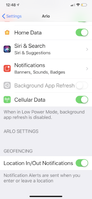
Could you then get the log from the app and PM me? You can get the app logs by double-tapping the Arlo icon in the Devices screen, and selecting 'Email logs'.
Appreciate your feedback! Thanks!
- Mark as New
- Bookmark
- Subscribe
- Mute
- Subscribe to RSS Feed
- Permalink
- Report Inappropriate Content
@theboot1 - another question...
Have you always logged in with the same account on this app(phone)?
Curious if you had a Friend account that you may have tried to log in with.
- Mark as New
- Bookmark
- Subscribe
- Mute
- Subscribe to RSS Feed
- Permalink
- Report Inappropriate Content
I’m not sure why the geofencing issues keep getting marked ‘resolved’, because it’s definitely not resolved for me. I’ve been checking several times a day for updates.
I’m running:
iPhone X
iOS 12.2
Arlo app 2.7.7
Base firmware 1.12.2.0_2794
-
Apple HomeKit
1 -
Arlo Mobile App
510 -
Arlo Pro
27 -
Arlo Pro 2
1 -
Arlo Pro 3
2 -
Arlo Secure
1 -
Arlo Smart
114 -
Arlo Ultra
1 -
Arlo Web and Mobile Apps
6 -
Arlo Wire-Free
10 -
Before You Buy
1,220 -
Discovery
1 -
Features
257 -
Firmware
1 -
Firmware Release Notes
119 -
Hardware
2 -
IFTTT
1 -
IFTTT (If This Then That)
48 -
Installation
1,448 -
Installation & Upgrade
1 -
Online and Mobile Apps
1,266 -
Partner Integrations
1 -
Security
1 -
Service and Storage
563 -
Smart Subscription
1 -
SmartThings
39 -
Software & Apps
1 -
Troubleshooting
7,444 -
Videos
1
- « Previous
- Next »
-
66 Replies
-
2018-03-22 05:08 AM
-
63127 Views
-
26 Likes
-
32 In Conversation
-