This topic has been marked solved and closed to new posts due to inactivity. We hope you'll join the conversation by posting to an open topic or starting a new one.
- Subscribe to RSS Feed
- Mark Topic as New
- Mark Topic as Read
- Float this Topic for Current User
- Bookmark
- Subscribe
- Printer Friendly Page
-
7 Replies
-
2026-03-15 01:03 PM
-
810 Views
-
1 Like
-
2 In Conversation
-


- Mark as New
- Bookmark
- Subscribe
- Mute
- Subscribe to RSS Feed
- Permalink
- Report Inappropriate Content
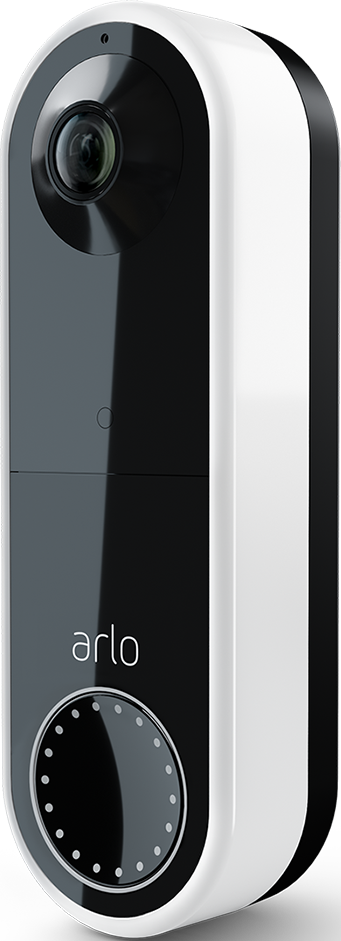
I have an arlo wired doorbell that I have been using for 2 years. I had an electrical issue that was resolved. I re-added my doorbell cam to my arlo base station and account. However, it now is showing inactive with message stating a paid subscription is required to activate. I have arlo plus unlimited paid subscription. Support is no help and just telling me I need to buy a new camera. I can’t believe that’s the solution. I need help clearing this error so that my doorbell camera records again as it did previously on my paid subscription plan. #arlowireddoorbell
Solved! Go to Solution.
- Related Labels:
-
Troubleshooting
Accepted Solutions
- Mark as New
- Bookmark
- Subscribe
- Mute
- Subscribe to RSS Feed
- Permalink
- Report Inappropriate Content
Replacement Doorbell video cam paired successfully and camera is working as expected.

- Mark as New
- Bookmark
- Subscribe
- Mute
- Subscribe to RSS Feed
- Permalink
- Report Inappropriate Content
I got same problem under the same conditions
- Mark as New
- Bookmark
- Subscribe
- Mute
- Subscribe to RSS Feed
- Permalink
- Report Inappropriate Content
Ridiculous! Buying a replacement doesn’t make sense. The camera is fine and was working until there was a mishap with wiring when adding an outlet in my basement. Wire disconnected from the nut, reattached, power issue solved.
- Mark as New
- Bookmark
- Subscribe
- Mute
- Subscribe to RSS Feed
- Permalink
- Report Inappropriate Content
Well, I removed it from the base hub and set up again straight to my mesh system. It works fine and comes up in my widgets and google home. Save the base hub for your cameras or something else. This works fine now.just set up outside the hub. There is a choice you can make in setup. Hours of frustration over. BTW tech support has not been helpful in the past. Take care.
- Mark as New
- Bookmark
- Subscribe
- Mute
- Subscribe to RSS Feed
- Permalink
- Report Inappropriate Content
I did see that I could pair without the hub. Support is sending me a replacement device even though I feel that’s not the solution but hey maybe they’ll prove me wrong. Hopefully when it arrives I can add it to my arlo hub cuz it would be preferable to manage all my cameras there. Thanks for the tip. If i have same problem I’ll add directly through my wifi.
- Mark as New
- Bookmark
- Subscribe
- Mute
- Subscribe to RSS Feed
- Permalink
- Report Inappropriate Content
Good on you convincing tech support to provide a replacement. Just an FYI.
even as set up directly to the mesh vs the hub. It all comes up in the Arlo App in one spot and shows on the feeds etc. It’s all consolidated on your app.
the hub appears to be required for the cameras. Anyways glad I could share a fix.
- Mark as New
- Bookmark
- Subscribe
- Mute
- Subscribe to RSS Feed
- Permalink
- Report Inappropriate Content
Oh ok! Thanks for the clarification. I’ll see what happens when I get my replacement. I wasn’t even trying to get one! I was hoping they could help solve the error. Appreciate the help.
- Mark as New
- Bookmark
- Subscribe
- Mute
- Subscribe to RSS Feed
- Permalink
- Report Inappropriate Content
Replacement Doorbell video cam paired successfully and camera is working as expected.
-
alarm
1 -
Amazon Alexa
1 -
Arlo Mobile App
300 -
Arlo Secure
1 -
Arlo Smart
149 -
Arlo Ultra
1 -
Arlo Video Doorbell
6 -
AVD1001-100NAS
1 -
Before You Buy
294 -
Doorbell
1 -
Dépannage
1 -
Features
352 -
Installation
598 -
Motion Detection
9 -
Online and Mobile Apps
12 -
Service and Storage
12 -
Troubleshooting
1,568 -
Videos
15
- « Previous
- Next »
-
7 Replies
-
2026-03-15 01:03 PM
-
811 Views
-
1 Like
-
2 In Conversation
-