- Subscribe to RSS Feed
- Mark Topic as New
- Mark Topic as Read
- Float this Topic for Current User
- Bookmark
- Subscribe
- Printer Friendly Page
-
25 Replies
-
2026-03-09 09:04 AM
-
1577 Views
-
10 Likes
-
10 In Conversation
-



- Mark as New
- Bookmark
- Subscribe
- Mute
- Subscribe to RSS Feed
- Permalink
- Report Inappropriate Content
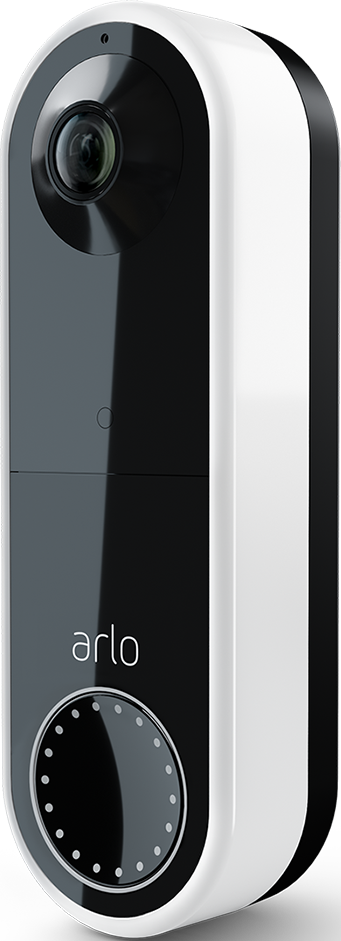
After updating my Arlo (wired) doorbell's firmware, I started receiving notifications even though I've muted the notifications. I have 3 other Arlo Pro 3 cameras all on the same Base System. I do not receive notifications from motion on the other cameras. How can I undo the update or stop receiving notifications?
Solved! Go to Solution.
- Related Labels:
-
Troubleshooting
Accepted Solutions


- Mark as New
- Bookmark
- Subscribe
- Mute
- Subscribe to RSS Feed
- Permalink
- Report Inappropriate Content
There was an update performed on the back end, This symptom should now be resolved. Please let me know if you're still experiencing this.
Thank you
- Mark as New
- Bookmark
- Subscribe
- Mute
- Subscribe to RSS Feed
- Permalink
- Report Inappropriate Content
Updating to the most recent version of the app in the app store did not correct the issue.
Rebooting the base station did not correct the issue.
Please fix the firmware.


- Mark as New
- Bookmark
- Subscribe
- Mute
- Subscribe to RSS Feed
- Permalink
- Report Inappropriate Content
While the update may have caused the issue somehow, it's not the firmware itself. The fastest way to fix this is to remove/reset/reinstall the doorbell to remove whatever glitch is happening.
https://kb.arlo.com/000062934/How-do-I-factory-reset-my-Arlo-Video-Doorbell-Arlo-Secure-4-0
- Mark as New
- Bookmark
- Subscribe
- Mute
- Subscribe to RSS Feed
- Permalink
- Report Inappropriate Content
I followed the instructions in the link to remove the doorbell. Then trying to add it was a nightmare and I'm not able to do it. After scrolling through the entire set of directions to install the doorbell, I was able to get to the screen to pair it. It found my doorbell and asked me to name the device. So I named it but it kept giving me some stupid error that it couldn't accept the name. I tried multiple names, short names, long names, names without spaces (I did not use any special characters), and it would not accept any name I entered. So I rebooted my base station, closed the app and tried again. Now it won't pair at all. Now what?
- Mark as New
- Bookmark
- Subscribe
- Mute
- Subscribe to RSS Feed
- Permalink
- Report Inappropriate Content
The Arlo development team is currently investigating reports of this behavior. We will provide an update as soon as we have more information to share with the community.

- Mark as New
- Bookmark
- Subscribe
- Mute
- Subscribe to RSS Feed
- Permalink
- Report Inappropriate Content
Please know that all of my cameras and my doorbell and base were working properly, then the doorbell in the App showed an exclamation sign and upon clicking it I was informed I needed to update my firmware. I did.
After the update the doorbell was giving me notifications even though I had them muted. I was only receiving notifications for the doorbell. The cameras were not sending notifications.
This thread said to delete the doorbell from the app and pair it. Once I did that I have not been able to add it. I've spent 4 hours with agents online. We've done everything. Please see my case with them.
I am even able to press the doorbell and answer it and see thru the camera during that but I cannot add the doorbell to my app.
This all started with the firmware update.

- Mark as New
- Bookmark
- Subscribe
- Mute
- Subscribe to RSS Feed
- Permalink
- Report Inappropriate Content
On iPhone 15 pro max, notifications mute function is not working. I tried different mute times (1 hour, 3 hour, 24 hour) and I'm still getting notifications for every event. Shut down the app and powered the phone off but still getting notifications. This just started happening within the last day or so.
Arlo App is v6.17.0 (20202) released Mar 3, 2026
Any ideas?
Thanks!
- Mark as New
- Bookmark
- Subscribe
- Mute
- Subscribe to RSS Feed
- Permalink
- Report Inappropriate Content
Updated App to v6.18.0 (20064) released Feb 27, 2026 (not sure why the date precedes the v6.17.0 release date).
Still have the same issue.
- Mark as New
- Bookmark
- Subscribe
- Mute
- Subscribe to RSS Feed
- Permalink
- Report Inappropriate Content
We also are having the same issue. It started yesterday morning. We contacted Arlo support and it’s an engineering issue. Hopefully soon it will be resolved.
- Mark as New
- Bookmark
- Subscribe
- Mute
- Subscribe to RSS Feed
- Permalink
- Report Inappropriate Content
Same issues. Tried everything. Have 4 cameras all sending notifications all day and night.
Very distracting during the work day.
- Mark as New
- Bookmark
- Subscribe
- Mute
- Subscribe to RSS Feed
- Permalink
- Report Inappropriate Content
Any update? This is super annoying!
- Mark as New
- Bookmark
- Subscribe
- Mute
- Subscribe to RSS Feed
- Permalink
- Report Inappropriate Content
same here; mute notification stopped working. Please fix ASAP!
- Mark as New
- Bookmark
- Subscribe
- Mute
- Subscribe to RSS Feed
- Permalink
- Report Inappropriate Content
I’m having the same issue. Hope it is resolved soon!
- Mark as New
- Bookmark
- Subscribe
- Mute
- Subscribe to RSS Feed
- Permalink
- Report Inappropriate Content
our problem has been resolved thank you
- Mark as New
- Bookmark
- Subscribe
- Mute
- Subscribe to RSS Feed
- Permalink
- Report Inappropriate Content
You can turn off notifications for the app itself if you have an Android.
However, DO NOT do what I did, which was to take the advice to delete the device in the app and try to reinstall it. As a result, I no longer can add the device (my doorbell) to my app. So I have a WORTHLESS doorbell. I've spent 10 hours online fighting with the chat support.
I'm wondering if I'll ever be able to use my doorbell again.
Not sure if anyone else has checked out their BBB profile. They have 37 pages of 1 star reviews. No 3, 4, or 5 star reviews. I think perhaps one or two 2 star reviews since their overall rating is 1.07. And don't be fooled by the A+ rating. That has nothing to do with their products or their support.
- Mark as New
- Bookmark
- Subscribe
- Mute
- Subscribe to RSS Feed
- Permalink
- Report Inappropriate Content
It is 100% the firmware update.
One
Hundred
Percent
- Mark as New
- Bookmark
- Subscribe
- Mute
- Subscribe to RSS Feed
- Permalink
- Report Inappropriate Content
Next time, test your updates. I have wasted 10 hours of time I'll never get back. And I may never get by doorbell working again, since I was told to remove the device and add it back.
When I try, 95% of the time, it will not recognize any devices.
The other 5% of the time, it actually finds it (I think only when I press the reset button for 60+ seconds), but then it will not let me name it. It gives me "Unable to name the camera. Please try again" - error (and yes, I am properly trying to add an Essential Video Doorbell Wired device, so not sure why it says "camera" in the error.
- Mark as New
- Bookmark
- Subscribe
- Mute
- Subscribe to RSS Feed
- Permalink
- Report Inappropriate Content
How?
- Mark as New
- Bookmark
- Subscribe
- Mute
- Subscribe to RSS Feed
- Permalink
- Report Inappropriate Content
- Mark as New
- Bookmark
- Subscribe
- Mute
- Subscribe to RSS Feed
- Permalink
- Report Inappropriate Content
Are you still experiencing this symptom with the mute notification feature not applying when set?
- Mark as New
- Bookmark
- Subscribe
- Mute
- Subscribe to RSS Feed
- Permalink
- Report Inappropriate Content
I cannot experience that symptom since I cannot add the doorbell back to my app as a device.
- Mark as New
- Bookmark
- Subscribe
- Mute
- Subscribe to RSS Feed
- Permalink
- Report Inappropriate Content
I have escalated your case & someone from support will be reaching out to you as soon as possible.
- Mark as New
- Bookmark
- Subscribe
- Mute
- Subscribe to RSS Feed
- Permalink
- Report Inappropriate Content
There was an update performed on the back end, This symptom should now be resolved. Please let me know if you're still experiencing this.
Thank you
- Mark as New
- Bookmark
- Subscribe
- Mute
- Subscribe to RSS Feed
- Permalink
- Report Inappropriate Content
This update DID NOT resolve my issue.
It is the same thing over and over again. Arlo owes me a new doorbell. Your update has caused me to not be able to use hardware that I bought with my money. It's worthless and useless. I've followed and tried every recommendation dozens of times, and it is not working.
- Mark as New
- Bookmark
- Subscribe
- Mute
- Subscribe to RSS Feed
- Permalink
- Report Inappropriate Content
Thank you for the feedback. I notified the appropriate team and I will report back asap.
-
Arlo Mobile App
445 -
Arlo Pro 3
7 -
Arlo Secure
2 -
Arlo Smart
320 -
Before You Buy
303 -
Features
407 -
Firmware Release Notes
4 -
Installation
365 -
Online and Mobile Apps
15 -
Service and Storage
17 -
Troubleshooting
1,920
-
25 Replies
-
2026-03-09 09:04 AM
-
1578 Views
-
10 Likes
-
10 In Conversation
-