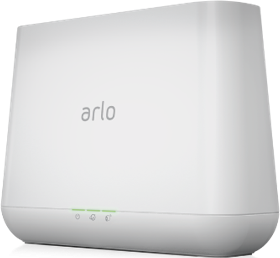
can't connect to base station vmb4000
- Subscribe to RSS Feed
- Mark Topic as New
- Mark Topic as Read
- Float this Topic for Current User
- Bookmark
- Subscribe
- Printer Friendly Page
-
12 Replies
-
2025-12-17 05:37 AM
-
1158 Views
-
0 Likes
-
5 In Conversation
-





- Mark as New
- Bookmark
- Subscribe
- Mute
- Subscribe to RSS Feed
- Permalink
- Report Inappropriate Content
wtf, cant connect to vmb4000
this error reported 300+ times - but no solution posted
except the moderator asks everyone to DM him/her - and this option is now disabled
really? wtf - no more arlo buying in future

- Related Labels:
-
Installation


- Mark as New
- Bookmark
- Subscribe
- Mute
- Subscribe to RSS Feed
- Permalink
- Report Inappropriate Content
@pssudr wrote:
except the moderator asks everyone to DM him/her - and this option is now disabled
No, you can still DM using the envelope icon in the upper right of the forum page.


- Mark as New
- Bookmark
- Subscribe
- Mute
- Subscribe to RSS Feed
- Permalink
- Report Inappropriate Content
The option to DM me is not disabled. You send a dm by clicking on the envelope icon on the top right of the forum page.If you don't see it, then go into your profile settings and select preferences, then "Private Messenger." Then select "Turn on private messages" if it is turned off.


- Mark as New
- Bookmark
- Subscribe
- Mute
- Subscribe to RSS Feed
- Permalink
- Report Inappropriate Content
The base offline issue is a common occurrence especially after a firmware update.
The usual workaround is to perform a power cycle of the base station.
I had to perform this again yesterday to both my base stations.
- Mark as New
- Bookmark
- Subscribe
- Mute
- Subscribe to RSS Feed
- Permalink
- Report Inappropriate Content
now i cant find the thread which asked to DM for a solution. can you help
- Mark as New
- Bookmark
- Subscribe
- Mute
- Subscribe to RSS Feed
- Permalink
- Report Inappropriate Content
The option to DM me is not disabled. You send a dm by clicking on the envelope icon on the top right of the forum page.If you don't see it, then go into your profile settings and select preferences, then "Private Messenger." Then select "Turn on private messages" if it is turned off.
- Mark as New
- Bookmark
- Subscribe
- Mute
- Subscribe to RSS Feed
- Permalink
- Report Inappropriate Content
- Mark as New
- Bookmark
- Subscribe
- Mute
- Subscribe to RSS Feed
- Permalink
- Report Inappropriate Content
Hi BrookeN, can you send me a token as well? My base station VMB4000 cannot find my home
- Mark as New
- Bookmark
- Subscribe
- Mute
- Subscribe to RSS Feed
- Permalink
- Report Inappropriate Content
I apologize for the delay in my response, I was out for the holidays. @affaho I've sent a token reset request to your base station that should resolve the issue. Please reboot your base station (remove and reapply power) allow the base station to come back online and try setting up HomeKit again using these instructions:
https://kb.arlo.com/000063184
- Mark as New
- Bookmark
- Subscribe
- Mute
- Subscribe to RSS Feed
- Permalink
- Report Inappropriate Content
@BrookeN , I’ve rebooted the base station but I still can’t find my camera connected to HomeKit. Could you please check on your end? Thanks!

- Mark as New
- Bookmark
- Subscribe
- Mute
- Subscribe to RSS Feed
- Permalink
- Report Inappropriate Content
Log out and then log back in and then try again. If you still are unable to connect to the homekit you will need to reset the basestation. However, if you do that you will need to add the cameras all back on.
- Mark as New
- Bookmark
- Subscribe
- Mute
- Subscribe to RSS Feed
- Permalink
- Report Inappropriate Content
@BrookeN I’ve reset the base station and added back the camera but still not working
- Mark as New
- Bookmark
- Subscribe
- Mute
- Subscribe to RSS Feed
- Permalink
- Report Inappropriate Content
The issues you're experiencing could be due to a hardware issue. We ask that you reach out to support for more information. You can get to support by going within the app on your mobile device click on the silhouette on the top left ~ support center ~ the device that you are needing assistance with then choose the behavior you are seeing. If by chance you do not have a subscription and are unable to reach out to support please send me a dm and I will create a ticket for you. You send a dm by clicking on the envelope icon on the top right of the forum page.
-
Arlo Mobile App
672 -
Arlo Pro 2
11 -
Arlo Smart
189 -
Before You Buy
1,006 -
Features
462 -
Firmware Release Notes
57 -
Google Assistant
1 -
IFTTT (If This Then That)
24 -
Installation
1,168 -
Online and Mobile Apps
865 -
Service and Storage
317 -
SmartThings
37 -
Troubleshooting
6,407
-
12 Replies
-
2025-12-17 05:37 AM
-
1159 Views
-
0 Likes
-
5 In Conversation
-