- Subscribe to RSS Feed
- Mark Topic as New
- Mark Topic as Read
- Float this Topic for Current User
- Bookmark
- Subscribe
- Printer Friendly Page
-
77 Replies
-
2026-08-02 02:48 PM
-
4547 Views
-
2 Likes
-
20 In Conversation
-





- Mark as New
- Bookmark
- Subscribe
- Mute
- Subscribe to RSS Feed
- Permalink
- Report Inappropriate Content
I have a pair of these camera’s and everyday they go offline for hours. I have reset, updated firmware and tried everything, but still to no avail. The internet signal is strong and the batteries are fully charged.



- Mark as New
- Bookmark
- Subscribe
- Mute
- Subscribe to RSS Feed
- Permalink
- Report Inappropriate Content

My Arlo essential out door camera continually goes offline and stays offline. It only happens in the back but I am 2 seconds to switching it out with a ring camera
- Mark as New
- Bookmark
- Subscribe
- Mute
- Subscribe to RSS Feed
- Permalink
- Report Inappropriate Content
It comes back online when there is movement in front of the camera

- Mark as New
- Bookmark
- Subscribe
- Mute
- Subscribe to RSS Feed
- Permalink
- Report Inappropriate Content
One of my new cameras is doing the same thing. Go into settings and power management. Turn off "Auto Low Power Mode". My camera came online without reseting it and it works fine now.
- Mark as New
- Bookmark
- Subscribe
- Mute
- Subscribe to RSS Feed
- Permalink
- Report Inappropriate Content
I did that to all my 5 cameras weeks ago and they still go offline.
- Mark as New
- Bookmark
- Subscribe
- Mute
- Subscribe to RSS Feed
- Permalink
- Report Inappropriate Content
Double check that the setting is still off. I had to turn it off twice before it stuck. The first time the camera came back online after a couple of minutes of spinning. I checked again about five minutes later and it was on again. Turned it off again and the change only took a second. Now it stays off.
- Mark as New
- Bookmark
- Subscribe
- Mute
- Subscribe to RSS Feed
- Permalink
- Report Inappropriate Content
When I leave the house all four cameras lose signal


- Mark as New
- Bookmark
- Subscribe
- Mute
- Subscribe to RSS Feed
- Permalink
- Report Inappropriate Content
Do the cameras still record? Are you using your phone as a hotspot for the cameras to access? What details can you add - what have you tried and what do you see?
- Mark as New
- Bookmark
- Subscribe
- Mute
- Subscribe to RSS Feed
- Permalink
- Report Inappropriate Content
At this point, I have tried 3 new routers, two service provides, multiple camera locations, etc. each with the same results.
On the latest router, I use the "IoT" network (which is basically another SSID band) just for the cameras, so there is no interference from other devices on the network.
This, and many other changes made absolutely no difference in the Essential 3rd generation behavior. They still keep going offline, but do still record motion, then drop back offline.
The tech support has gone completely dark, with no response. When I call tech support, they say the case has been escalated to the "Engineering Department" and I will be contacted in 24 to 48 hours. Needless to say, this has been going on for over a month with no updates and no resolution.
At this point, I am at a complete loss of what to try next.


- Mark as New
- Bookmark
- Subscribe
- Mute
- Subscribe to RSS Feed
- Permalink
- Report Inappropriate Content
I apologize for the frustration. Our team is currently investigating this, I will update the community soon.
- Mark as New
- Bookmark
- Subscribe
- Mute
- Subscribe to RSS Feed
- Permalink
- Report Inappropriate Content
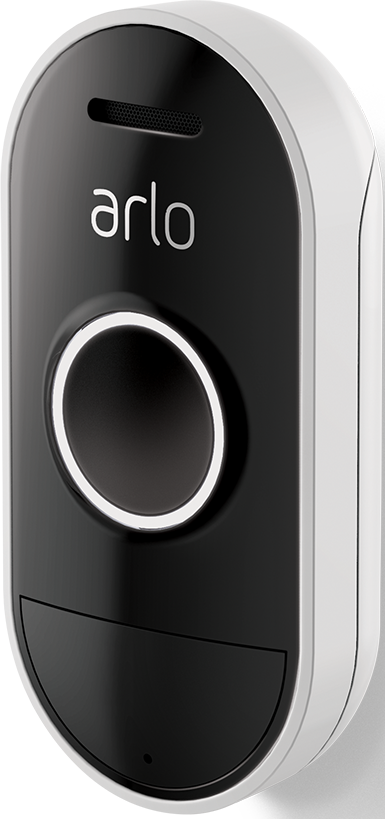
One of my arlo security cameras is telling me its offline. What is the easiest way to get it back online?

- Mark as New
- Bookmark
- Subscribe
- Mute
- Subscribe to RSS Feed
- Permalink
- Report Inappropriate Content
@Bodean40 wrote:
One of my arlo security cameras is telling me its offline. What is the easiest way to get it back online?
What camera model? Details depend on what you have.
You posted in the Essential Gen 3 area, but put an audio doorbell in your tag.
Also is the camera connected to an Arlo hub? Or is it connected to your home wifi (or perhaps mobile data)?
- Mark as New
- Bookmark
- Subscribe
- Mute
- Subscribe to RSS Feed
- Permalink
- Report Inappropriate Content
I’m experiencing the same issue. This is really frustrating.
- Mark as New
- Bookmark
- Subscribe
- Mute
- Subscribe to RSS Feed
- Permalink
- Report Inappropriate Content
Cameras want stay online
- Mark as New
- Bookmark
- Subscribe
- Mute
- Subscribe to RSS Feed
- Permalink
- Report Inappropriate Content
I’ve been having the same issue with my cameras randomly losing signal. It can be really frustrating, especially when everything appears to be powered on but the connection keeps dropping. I’d recommend checking the Wi-Fi strength, restarting the cameras and router, and making sure the firmware is up to date. If the problem continues, it may be worth checking whether other devices on the network are experiencing similar dropouts, as that could point to a router or network issue rather than the cameras themselves. pikepass com
- Mark as New
- Bookmark
- Subscribe
- Mute
- Subscribe to RSS Feed
- Permalink
- Report Inappropriate Content
Our team is currently investigating the behavior you are seeing. I will update the community as soon as possible.
- Mark as New
- Bookmark
- Subscribe
- Mute
- Subscribe to RSS Feed
- Permalink
- Report Inappropriate Content
Hi,
Unfortunately, I’ve had a really poor experience and I’m now struggling to work out how I can actually make a formal complaint.
I have already contacted you through the app regarding my concerns, but my message still hasn’t been responded to. At this point, I’m unsure what else I’m supposed to do or who I need to contact to have my complaint acknowledged and addressed.
- Mark as New
- Bookmark
- Subscribe
- Mute
- Subscribe to RSS Feed
- Permalink
- Report Inappropriate Content
Hi,
I am sorry to hear that you had a poor experience. Can you please provide more details on what you experienced? If you prefer to send it dm you can do that as well. You send a dm by clicking on the envelope icon on the top right of the forum page.If you don't see it, then go into your profile settings and select preferences, then "Private Messenger." Then select "Turn on private messages" if it is turned off.
- Mark as New
- Bookmark
- Subscribe
- Mute
- Subscribe to RSS Feed
- Permalink
- Report Inappropriate Content
have send to you a message, ticket 96198560 should have all you need to see where we are at (or not at)
- Mark as New
- Bookmark
- Subscribe
- Mute
- Subscribe to RSS Feed
- Permalink
- Report Inappropriate Content
Hi All
I have just bought a 2 pack of Essential 3rd gen cameras and both go offline however still record. Both running on direct wifi connection. I have now reset twice. Thinking of taking them back for a refund. Please help.
- Mark as New
- Bookmark
- Subscribe
- Mute
- Subscribe to RSS Feed
- Permalink
- Report Inappropriate Content
We are aware of the behavior you are seeing. Our team is currently investigating this, I will update you as soon as possible.
- Mark as New
- Bookmark
- Subscribe
- Mute
- Subscribe to RSS Feed
- Permalink
- Report Inappropriate Content
Any update on the issues with the 3rd Gen camera's?
We are also having ongoing issues with them. The picture quality isn't that great and are always going offline and will not reconnect without us having to press the camera button for 3 seconds. Makes it a bit hard when they are mounted up high.
Have chatted with online support and seems when they dont know what the issue is, they leave the chat.
Time to look for another brand of camera's. Eufy seems to be the go, and no monthly subscriptions.
Been with Arlo for years and all our older model camera's are better than these 3rd Gen ones.
- Mark as New
- Bookmark
- Subscribe
- Mute
- Subscribe to RSS Feed
- Permalink
- Report Inappropriate Content
HI,
Wanted to check in and see who is still seeing this behavior?
- Mark as New
- Bookmark
- Subscribe
- Mute
- Subscribe to RSS Feed
- Permalink
- Report Inappropriate Content
Ours haven't gone off line lately, however, the picture quality is still poor when we look at the camera's from a pc. On another note, our essential spotlight is terrible. I thought these were outdoor camera's. The whole outside of the picture is blurry. Have tried cleaning the lens, putting the camera in rice and also the hot water cupboard. I just dont think for the price of the subscription, that the camera's are very good quaity.

- Mark as New
- Bookmark
- Subscribe
- Mute
- Subscribe to RSS Feed
- Permalink
- Report Inappropriate Content
I can confirm problem is still there. I also tried keeping them powered and splitting my WiFi in 2 channels to assure band steering wasn’t causing the issue but still happens randomly on cameras either they have full strength signal or not. Again I can say that this only happens on my gen 3 cameras. The essential Xls work fine
- Mark as New
- Bookmark
- Subscribe
- Mute
- Subscribe to RSS Feed
- Permalink
- Report Inappropriate Content
100% agree with Anthony456. Have noticed these are the only camera's that do not reconnect when there has been a power cut and the internet has been down. All other older camera's that are connected to the hub station work and re connect perfectly.
-
77 Replies
-
2026-08-02 02:48 PM
-
4547 Views
-
2 Likes
-
20 In Conversation
-