Cannot Add Device of VMB4000 Arlo Pro Base Station
- Subscribe to RSS Feed
- Mark Topic as New
- Mark Topic as Read
- Float this Topic for Current User
- Bookmark
- Subscribe
- Printer Friendly Page
-
4 Replies
-
2025-11-29 08:07 AM
-
715 Views
-
0 Likes
-
4 In Conversation
-




- Mark as New
- Bookmark
- Subscribe
- Mute
- Subscribe to RSS Feed
- Permalink
- Report Inappropriate Content
I'm seeing an issue like in https://community.arlo.com/t5/Arlo-Pro-2/Arlo-Base-Station-VMB-4000-known-outage/m-p/2332032#M61977
and https://community.arlo.com/t5/Arlo/Cannot-add-VMB4000/td-p/2412090
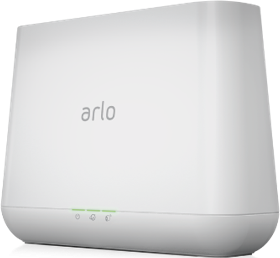
I have a VMB4000 that was working for many years. Some combination of recent new phones, Base Station Reboots, and Base Station Resets, and now I currently have LEDs:
Power: solid green
Internet: mostly solid green, occasional blinks (using wired ethernet)
Cameras: solid amber. unsure if cameras are synced now, but I'm starting with the Base Station
Using Android Arlo Secure App and My Arlo web page, I keep getting No Arlo devices found when trying to add a device.
- Related Labels:
-
Troubleshooting


- Mark as New
- Bookmark
- Subscribe
- Mute
- Subscribe to RSS Feed
- Permalink
- Report Inappropriate Content
The issues you're experiencing could be due to a hardware issue. We ask that you reach out to support for more information. You can get to support by going within the app on your mobile device click on the silhouette on the top left ~ support center ~ the device that you are needing assistance with then choose the behavior you are seeing. If by chance you do not have a subscription and are unable to reach out to support please send me a dm and I will create a ticket for you. You send a dm by clicking on the envelope icon on the top right of the forum page.
- Mark as New
- Bookmark
- Subscribe
- Mute
- Subscribe to RSS Feed
- Permalink
- Report Inappropriate Content
@BrookeN I can't find the DM envelope icon you mentioned. Currently, we don't have a subscription, so if you could create a ticket, that'd be great. Thank you.

- Mark as New
- Bookmark
- Subscribe
- Mute
- Subscribe to RSS Feed
- Permalink
- Report Inappropriate Content
Ensure that your base station and cameras are removed from your account - this should be done within the app.
Then, ensure that you reset the base station properly (the KB says keep the reset button pressed for 10s, but I found it actually needs a bit longer; I do it for 15-20s) and cameras, too.
Then, clear cache etc on your app (you can actually uninstall the app instead, then restart your phone and re-install the app).
Finally, add the base station to the account and cameras, one by one.
Hope this works for you.


- Mark as New
- Bookmark
- Subscribe
- Mute
- Subscribe to RSS Feed
- Permalink
- Report Inappropriate Content


-
Apple HomeKit
1 -
Arlo Mobile App
497 -
Arlo Pro
27 -
Arlo Pro 2
1 -
Arlo Pro 3
2 -
Arlo Secure
1 -
Arlo Smart
108 -
Arlo Ultra
1 -
Arlo Web and Mobile Apps
6 -
Arlo Wire-Free
10 -
Before You Buy
1,214 -
Discovery
1 -
Features
251 -
Firmware
1 -
Firmware Release Notes
119 -
Hardware
2 -
IFTTT
1 -
IFTTT (If This Then That)
48 -
Installation
1,441 -
Installation & Upgrade
1 -
Online and Mobile Apps
1,266 -
Partner Integrations
1 -
Security
1 -
Service and Storage
563 -
Smart Subscription
1 -
SmartThings
39 -
Software & Apps
1 -
Troubleshooting
7,421 -
Videos
1
- « Previous
- Next »
-
4 Replies
-
2025-11-29 08:07 AM
-
716 Views
-
0 Likes
-
4 In Conversation
-