- Subscribe to RSS Feed
- Mark Topic as New
- Mark Topic as Read
- Float this Topic for Current User
- Bookmark
- Subscribe
- Printer Friendly Page
-
56 Replies
-
2026-06-27 11:37 AM
-
5667 Views
-
17 Likes
-
24 In Conversation
-




- Mark as New
- Bookmark
- Subscribe
- Mute
- Subscribe to RSS Feed
- Permalink
- Report Inappropriate Content
Hello.
I have three Arlo Essential Outdoor Cameras third generation and three Arlo Essential Outdoor Cameras second generation. All were connected to the WiFi and working well until three weeks ago. Nothing changed, no loss of power, no password change, nothing different happened.
The third generation cameras went offline. And then while troubleshooting the third generation cameras yesterday, the second generation cameras went offline.
I am getting either the error code of 12800 for no internet connection or just no internet connection error for all 6 cameras.
I have reset all cameras. I have uninstalled the app and reinstalled it. I have offloaded the app and restored it. I have unplugged the router and also reset the router. I have brought the cameras inside and placed directly next to the router. The router is a Verizon gateway router. And all the cameras are charged to at least 70% for batteries.
The internet connection is up and working and is the 2.4 GHz, the same on the iPhone. Bluetooth is connected and has permission.
I have called customer support and currently have a ticket in place however nothing as far as trouble shooting is working to get all 6 cameras back connected to the WiFi.
Does anyone have any thoughts or recommendations moving forward?
These cameras are 7-8 months old and purchased as 2 three packs on Amazon.
Thanks.
Solved! Go to Solution.
Accepted Solutions


- Mark as New
- Bookmark
- Subscribe
- Mute
- Subscribe to RSS Feed
- Permalink
- Report Inappropriate Content
This should now be resolved, if anyone is still seeing this behavior, please reach out to me directly.
Best answers
-
Hello everyone,
We appreciate all the patience you have shown while we investigated this behavior.
We have a fix for the error message you are seeing. However, it does need a mobile hotspot or alternate Wi-Fi to preform these steps.
If you have this available please send me a message and I can walk you through the steps.
If you do not have this available, please still dm me and let me know.
Thank you.
-
I have passed this information onto our development team. I will reach back out to you as soon as possible.



- Mark as New
- Bookmark
- Subscribe
- Mute
- Subscribe to RSS Feed
- Permalink
- Report Inappropriate Content
@GoLions2026 wrote:
I have reset all cameras.
Did you remove the cameras from your account after the reset (and then reinstall them)?
- Mark as New
- Bookmark
- Subscribe
- Mute
- Subscribe to RSS Feed
- Permalink
- Report Inappropriate Content
Yes and still no connection to internet.
- Mark as New
- Bookmark
- Subscribe
- Mute
- Subscribe to RSS Feed
- Permalink
- Report Inappropriate Content
Also Arlo app is up to date.
- Mark as New
- Bookmark
- Subscribe
- Mute
- Subscribe to RSS Feed
- Permalink
- Report Inappropriate Content


these are the error messages that I get when trying to connect to WiFi for either the second generation or third generation outdoor essential cameras

- Mark as New
- Bookmark
- Subscribe
- Mute
- Subscribe to RSS Feed
- Permalink
- Report Inappropriate Content
I am having the same problem as you. I have the 2nd generation cameras that are only about 6 months old..i guess i need to call Arlo and see what they will do. I have also done everything you have done as well and still get the error meassage..12800.
- Mark as New
- Bookmark
- Subscribe
- Mute
- Subscribe to RSS Feed
- Permalink
- Report Inappropriate Content
Can you provide if you are on Android or iOS? What firmware are you on as well?
- Mark as New
- Bookmark
- Subscribe
- Mute
- Subscribe to RSS Feed
- Permalink
- Report Inappropriate Content
iOS - 26.5.2 (recently updated today)
Modem Firmware - 2.05.04
- Mark as New
- Bookmark
- Subscribe
- Mute
- Subscribe to RSS Feed
- Permalink
- Report Inappropriate Content
I have passed this information onto our development team. I will reach back out to you as soon as possible.
- Mark as New
- Bookmark
- Subscribe
- Mute
- Subscribe to RSS Feed
- Permalink
- Report Inappropriate Content
I am having the exact same issue with brand new cameras. Also on a Verizon Gateway. Galaxy S26 running latest verion of SW. Error 12800. Very frustrating.
- Mark as New
- Bookmark
- Subscribe
- Mute
- Subscribe to RSS Feed
- Permalink
- Report Inappropriate Content
Just as a heads up - I spoke with Arlo yesterday and this isn’t an individual problem/issue. Meaning many people are having the same issue as described above. The engineering technical team is working on a solution. This isn’t necessarily reflected on any Arlo information site but I wanted to let others know that the technician yesterday stated that Arlo is aware of this “issue” for many people and are currently working on it.
- Mark as New
- Bookmark
- Subscribe
- Mute
- Subscribe to RSS Feed
- Permalink
- Report Inappropriate Content
I am also having this issue. I have a Verizon gateway passthrough mode to an ASUS router. Please notify me once resolved.
- Mark as New
- Bookmark
- Subscribe
- Mute
- Subscribe to RSS Feed
- Permalink
- Report Inappropriate Content
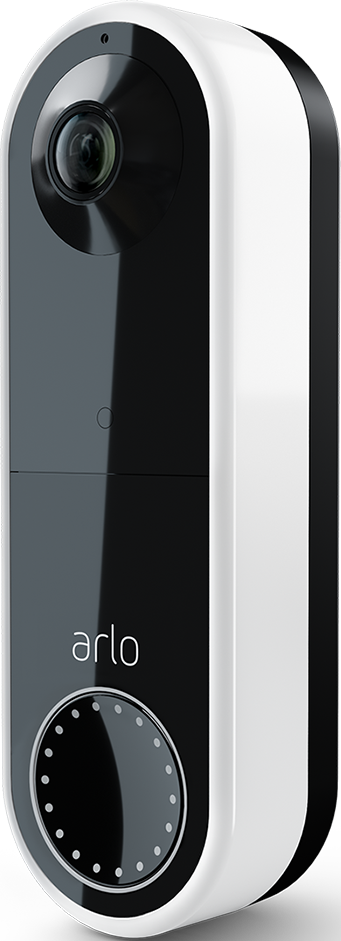
Is there a fix for this yet? I have an arlo doorbell that was working fine yesterday but now has this issue

- Mark as New
- Bookmark
- Subscribe
- Mute
- Subscribe to RSS Feed
- Permalink
- Report Inappropriate Content
I also do not have a working doorbell, with error code 12800. I have spent the entire day chatting with support, and have not gotten anywhere. They are no help. I'm forced to pay a subscription fee for this doorbell, and it has not worked for probably 75% of the time I've paid for (not to mention the cost of the device). I am very unhappy and want a refund for this bad product and their equally unhelpful service team. An entire day wasted, and I still don't have a working doorbell! I cannot imagine what Arlo can do to redeem their product or company. At this point, I have earned a total refund for all the money we have spent on Arlo.
- Mark as New
- Bookmark
- Subscribe
- Mute
- Subscribe to RSS Feed
- Permalink
- Report Inappropriate Content
I do apologize for the frustration. We are still currently investigating this behavior. I will update the community again soon.
- Mark as New
- Bookmark
- Subscribe
- Mute
- Subscribe to RSS Feed
- Permalink
- Report Inappropriate Content
Is there any update? I haven’t had cameras up for over a month and still being charged for the subscription
- Mark as New
- Bookmark
- Subscribe
- Mute
- Subscribe to RSS Feed
- Permalink
- Report Inappropriate Content
I am having the same issue with three doorbells, 2nd generation using Android. Arlo wasn't much help with troubleshooting. I sent them my app logs and have not heard back. They also told me this was a known issue for many people.
- Mark as New
- Bookmark
- Subscribe
- Mute
- Subscribe to RSS Feed
- Permalink
- Report Inappropriate Content
My doorbell (Gen 2) also got the same issues. On the mobile app it suddenly said "couldn't locate the device" 3 days ago. I have tried everything that the support AI suggested and still not working. I have also tried removing the device and add it as new, but still stucks at the 12800 error. May I know if the others got resolved yet?
- Mark as New
- Bookmark
- Subscribe
- Mute
- Subscribe to RSS Feed
- Permalink
- Report Inappropriate Content
So frustrating. Already received a replacement camera but the same issue. I have spent so much time with tech support and no solution. Every time I call, they make me jump through the same hoops, say they escalated the issue, but never come back with a solution. Haven’t had the door bell for over a month. So over Arlo. Might switch to different provider all together.

- Mark as New
- Bookmark
- Subscribe
- Mute
- Subscribe to RSS Feed
- Permalink
- Report Inappropriate Content
I’m having the exact same issue on my second generation doorbell camera. It is very hard to believe that the development team has not been able to provide any kind of feedback on an expected resolution date. This has been going on for over two months now?
- Mark as New
- Bookmark
- Subscribe
- Mute
- Subscribe to RSS Feed
- Permalink
- Report Inappropriate Content
I did some more debugging with My Verizon Router and the actual connectivity part is fine, meaning I get a DHCP lease and everything works. It gets fuzzy with DNS resolution.
I tried by pairing it to my neighbors Wi-Fi who has Comcast Internet, and it works just fine. I’ve had trouble with Verizon’s DNS before and unfortunately, their gateways don’t allow you to override the DNS settings. At least mine does not.
- Mark as New
- Bookmark
- Subscribe
- Mute
- Subscribe to RSS Feed
- Permalink
- Report Inappropriate Content
@micxba wrote:
I’ve had trouble with Verizon’s DNS before and unfortunately, their gateways don’t allow you to override the DNS settings. At least mine does not.
Same with Spectrum.
- Mark as New
- Bookmark
- Subscribe
- Mute
- Subscribe to RSS Feed
- Permalink
- Report Inappropriate Content
If anyone can try to pair it using a hotspot or another Wi-Fi and gets it online. If you can let me know when it is online I can rollback the firmware and then you should be able to successfully onboard it to your current Wi-Fi. However, to roll back the firmware I will need it to be online first.
- Mark as New
- Bookmark
- Subscribe
- Mute
- Subscribe to RSS Feed
- Permalink
- Report Inappropriate Content
I was able to do that. Can you contact me?
- Mark as New
- Bookmark
- Subscribe
- Mute
- Subscribe to RSS Feed
- Permalink
- Report Inappropriate Content
Same here, I’m currently connected to my neighbors Wi-Fi. What do you need to roll back the firmware?
SN AEV242BT00DF9
-
180 degree
1 -
250-50602-01
1 -
alerts
1 -
Alexa
1 -
Amazon Alexa
1 -
Android App
1 -
animal
1 -
api_key
1 -
Arlo
1 -
Arlo 2nd Gen
1 -
Arlo Cameras
2 -
Arlo Essential 2nd Gen always goes offline
1 -
Arlo Essential Spotlight
2 -
Arlo Mobile App
23 -
Arlo Secure 4.0
1 -
Arlo Smart
2 -
base station
1 -
Batteries
1 -
Battery life
2 -
Battery.
1 -
Before You Buy
9 -
camera
2 -
connection
1 -
constant
1 -
customer service
1 -
Doorbell reset
1 -
drained battery
1 -
Essential
1 -
Essential Camera feature request
1 -
Essential outdoor
1 -
Features
14 -
freeze
1 -
Google Nest
1 -
Idk
1 -
Installation
15 -
motion
1 -
Motion Detection
3 -
motiondetection
1 -
need help
1 -
network
1 -
New features
1 -
Night vision
1 -
No recordings
1 -
not working
1 -
Orbi
1 -
Other Discussions
1 -
Payment
1 -
privacy zones essential 2k
1 -
problemshooting
1 -
Product
1 -
Record
1 -
Reliable
1 -
returns
1 -
Router
1 -
sensor not working
1 -
Siren
1 -
smart things
1 -
too many
1 -
Troubleshooting
73 -
Unknown charges
1 -
VMC3050
1
- « Previous
- Next »
-
56 Replies
-
2026-06-27 11:37 AM
-
5668 Views
-
17 Likes
-
24 In Conversation
-